During my time at 1047 Games, I had the opportunity to implement data-driven detailing and terrain generation systems that dynamically accounted for level geometry, gameplay elements, and portal placements. These systems carved traversal paths into the landscape, adapted material placement, scattered objects in pre-defined areas, accessed stored landscape data to drive it and removed details from high-traffic areas.
Breakdown:
The workflow starts with a premade, design team blockout, whether that be geometry, landscape or both and produces a procedural base for the art teams to work off. More specific details can be read in my posts about Grit and Frontier. The workflow also accounted for version control and seasonal content changes or updates for each level. We could switch back and forth to different events or map changes by simply informing the Cache Load HDA of a requested change.
Finally, the tool set also ran requested update passes over the original base if level design or geometry had changed to the point where the original was no longer accurate.
Many of the tools created serve very specific purposes and require links to other nodes to function. With that in mind, I will not be showing all 106 HDA tools created for the project and the landscape pipeline. I will, however, be showing working examples that are a combination of these HDAs over an example landscape.
The tools encompass many different methods of working, empowering artists to craft and detail landscapes with ease. Running through more standardised tools once their edits are complete, to process the information into usable data for the two core tools: Cache Load & Manager.
Note: In this project, I broke the Cache down into some core parts for better control and versioning:
Cache Types = Blockout > Working > Production > Season > Version.
-
Blockout is the original design team, Cache and cannot be edited by the tools. It serves as a constant reference point. It can, however, be updated from the UE editor side if it is adapted.
-
Working represents the Cache that is set to be modified or adapted in some way, to replace Procution.
-
Production represents the current loaded Cache in the level.
-
Season is a version of the Cache that branches to accommodate themed editing.
-
Version has many uses, mainly the ability to stage the working Cache into separate drafts to prevent feedback loops or test new production changes without harming the known loaded Cache.
Detailing:
The two primary methods of external detailing are, but not limited to:
1. Gaea:
HDAs that incorporate the Labs Gaea nodes, alongside additional functionality and common operations to reduce time spent repeating operations.
Erosion, noise, detailing and biome blending are processed within Gaea, then exported as heightmaps and splatmaps.
These outputs are optimised by the tools and saved for access by the Cache Load & Manage HDAs.
2. LIDAR Support:
LIDAR data is taken from a variety of sources, including government archives, satellite scans, and drone captures.
Point clouds are processed into heightfields, then manually moved into place.
The data is then passed through a preprocessing stage before being blended into the existing cache and saved.
 Each tool is designed to make it very clear and easy for anyone to work within Houdini, operating on an intermediate level of knowledge, without needing to lay down tens of nodes to get started.
 The main detailing method is a series of advanced Houdini nodes created for the project to simulate points over the landscapes, generate complex tile-based details and splat maps, then stitch them back together to form the final result. Allowing a very high-resolution workflow that can be processed in parallel with TOPs. The highest resolution map I produced with these tools was 32k and then down-sampled to 8k for the BR modes.
The artist may also work in Unreal's editor, and the Cache manager will instead save those as mixable assets, storing them for later integration into the production cache.
Showcase of the Cache Load & Manager with its preview material, inside Houdini.
Showcase of the processing tools, working on the example file, inside Houdini.
This stage is reserved to produce the landscape's base resolution, scale, base attributes, Cache data and remap any incorrect information that may have been applied during initial creation. It also holds a render section to bake the layers to disk if any DCC or Image editing is requested. Additional HDA tools can also then use this cleaned version of a map to send back to Gaea for further editing, and the above steps can be repeated once completed.
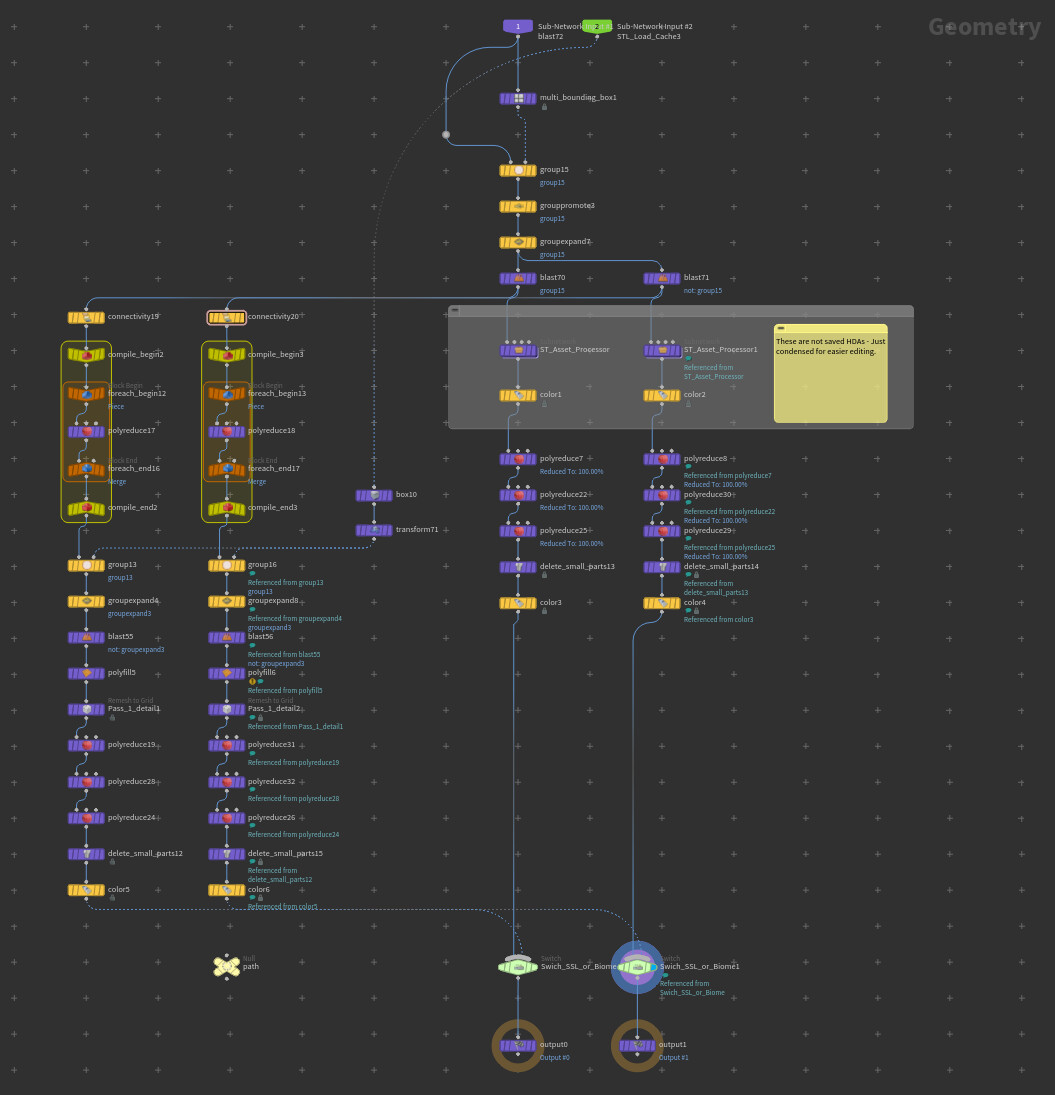
Level geometry, gameplay elements and volumes are handled similarly, but processed first by this tool that breaks all assets into 7 groups, assigns attributes to them and then saves them to a separate, managed Cache for use in further tooling. Loaded dynamically based on the Cache load tool, its state and whether these Cache files exist. Each of the 7 elements are used during Splatmap and height manipulations, better explained in my Grit post.
This concludes the first step of landscape creation for Splitgate 2. These stages are repeated as many times as necessary during the production of each map.
My next blog post will share some details on Vista Generation, Procedural Road networks, Scattering, Simulation, Flow mapping, macro mapping and mesh generation all used to support the production process.
Thank you!